
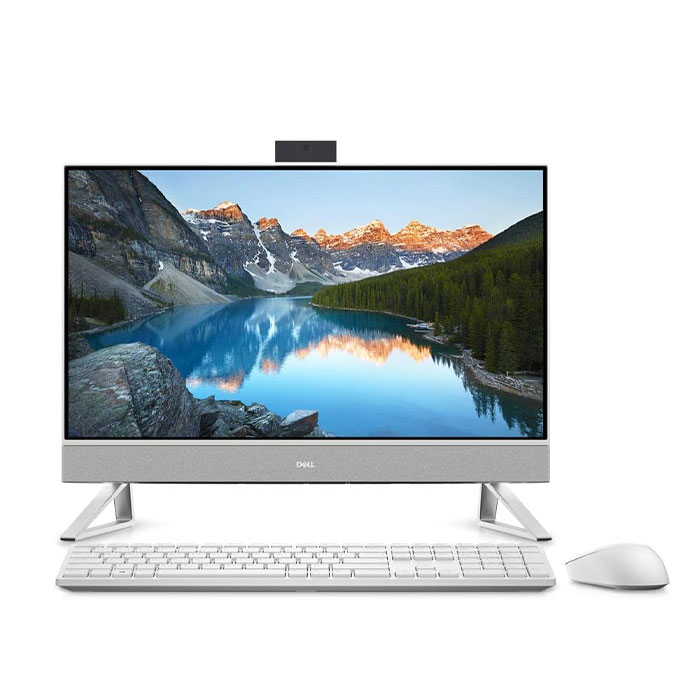
Description Tech Specs Processor 12th Gen Intel® Core™ i5-1235U Operating System (Dell Technologies recommends Windows 11 Pro for business) Windows 11 Home, English Graphics Card NVIDIA GeForce MX550 with 2GB GDDR6 graphics memory Monitor 23.8″, FHD 1920×1080, 60Hz, AIT Touch, Anti-Glare, InfinityEdge Memory * 8GB, 1x8GB, DDR4, 3200MHz Hard Drive 256 GB, M.2, PCIe NVMe, SSD Case Touch Pearl White Stand Triangle stand Microsoft Office No Microsoft Office Included Comprehensive digital protection – including antivirus, privacy and identity protections McAfee® LiveSafe™ 30-day trial Protect your purchase – View Support offers below * 1 Year Hardware Service with Onsite/In-Home Service After Remote Diagnosis Accidental Damage Service None Keyboard Dell Pro Wireless Keyboard and Mouse – KM5221W White – English Mouse Mouse Included Ports 1 USB 3.1 Gen 1 port with Power on/Wake-up support 2 USB 3.1 Gen 1 ports 1 USB 3.1 Gen 2 port with PowerShare 1 USB 3.2 Type-C Gen 2 port 1 HDMI 1.4b port 1 HDMI-in 1.4b port 1 RJ45 Ethernet port 1 Audio 1 DC-In 1 Power-adapter port Slots 1 SD-card slot Dimensions & Weight Pearl White with Triangle Stand Height: 16.21 in. (411.9 mm) Width: 21.37 in. (542.7 mm) Depth: 7.90 in. (200.69 mm) With Triangle Stand: Starting weight: Touchscreen 12.32 lbs. (5.59 kg)*, Non-Touchscreen 12.27 lbs. (5.57 kg)* Dark Shadow Gray with Arch Stand Height: 16.21 in. (411.9 mm) Width: 21.37 in. (542.7 mm) Depth: 7.86 in. (199.55 mm) With Arch Stand: Starting weight: Touchscreen 12.17 lbs. (5.52 kg)*, Non-Touchscreen 12.10 lbs. (5.49 kg)* Without Stand: Starting weight: Touchscreen 11.62 lbs. (5.27 kg)*, Non-Touchscreen 11.62 lbs. (5.27 kg)* Chassis Color Options Dark Shadow Gray Pearl White Exterior Chassis Materials Rear Cover / Mid Frame – Plastic Resin Arch stand exterior – Plastic Resin Triangle stand exterior – Aluminium or Aluminium alloy Wireless * Intel® Wi-Fi 6E (6GHz) AX211 2×2 Bluetooth 5.2 Wireless Card Power 90 W AC adapter, 4.5 mm barrel 130 W AC adapter, 4.5 mm barrel Regulatory How easy is it to compare and select options for this product?Rating is from 1-7, 1 being the most difficult and 7 being the easiest Features Operating system Available with Windows 11. “Picture of a white and a black Dell Inspiron 24 5410 All-in-Ones side by side.” data-src=”https://i.dell.com/is/image/DellContent/content/dam/ss2/product-images/dell-client-products/desktops/inspiron-desktops/24-5410/pdp/desktop-inspiron-24-5410-aio-pdp-mod01-bk-gy.psd?qlt=95&fit=constrain,1&hei=400&wid=965&fmt=png-alpha” /> <img class=”u-max-full-width” src=”data:;base64,” alt=”Picture of a white Dell Inspiron 24 5410 All-in-One with a woman wearing pink heart sunglasses on the screen.” data-src=”https://i.dell.com/is/image/DellContent/content/dam/ss2/product-images/dell-client-products/desktops/inspiron-desktops/24-5410/pdp/desktop-inspiron-24-5410-aio-pdp-mod02-gy.psd?qlt=95&fit=constrain,1&hei=321&wid=390&fmt=png-alpha” /> A stunning screen on a stylish PC The choice between a sleek, slim do-it-all PC in Dark Shadow Gray or Pearl White is yours. The whole family will be competing for screen time, thanks to it’s narrow 4-sided borders and a FHD IPS display with 99% sRGB coverage and blue light reducing ComfortView Plus. This AIO display features ComfortView Plus to help reduce harmful blue light and a flicker free panel optimizing eye comfort. With an FHD IPS display that features an improved color Gamut that went from 72% NTSC to 99% sRGB, the options are endless. You can work, stream, or even do some light gaming all while having a pleasant front screen experience. Upgrade your sound Turn your Inspiron All-in-one into a Bluetooth speaker. You can connect your mobile device seamlessly with the AIO to play your favorite playlist or podcast and enjoy clear, rich and louder audio anywhere in the room without the need of a headset. You can intuitively adjust the audio preference to your liking with Waves MaxxAudio Pro. Now you can enjoy all of your entertainment needs in one spot. Made for video chatting A FHD pop-up camera that puts your best face forward every time. What’s even better? The camera disappears when you’re ready for downtime. Plus, with Wide Dynamic Range, you’ll see your video chats in a whole new light. <img class=”u-max-full-width” src=”data:;base64,” alt=”Picture of a Dell Inspiron 24 5410 All-in-One screen focused on the webcam available above the product.” data-src=”https://i.dell.com/is/image/DellContent/content/dam/ss2/product-images/dell-client-products/desktops/inspiron-desktops/24-5410/pdp/desktop-inspiron-24-5410-aio-pdp-mod03-gy.psd?qlt=95&fit=constrain,1&hei=400&wid=965&fmt=png-alpha” /> <img class=”u-max-full-width” src=”data:;base64,” alt=”Picture of a white Dell Inspiron 24 5410 All-in-One monitor showing the ports available behind the product.” data-src=”https://i.dell.com/is/image/DellContent/content/dam/ss2/product-images/dell-client-products/desktops/inspiron-desktops/24-5410/pdp/desktop-inspiron-24-5410-aio-pdp-mod04-gy.psd?qlt=95&fit=constrain,1&hei=321&wid=390&fmt=png-alpha” /> Built for tons of entertainment, storage and more This All-in-One features the latest Intel® 12th Gen Processors with multiple storage options to choose from for all your files, photos and videos. With 5 USB ports and Wifi 6E capability, you’ll stay connected and never be caught waiting on an unstable signal. Expand your productivity with HDMI-in/HDMI-out ports that allow you to connect to a separate PC and use this one as a secondary monitor. <img class=”u-max-full-width” src=”data:;base64,” alt=”Windows 11″ data-src=”https://i.dell.com/is/image/DellContent/content/dam/ss2/product-images/page/landing-page/windows-11/pdp/windows-11-intgrtn-iw.psd?fmt=png-alpha&wid=1400&hei=800&fit=fit,1&qlt=100,0″ /> Their latest. Our greatest. Together, Windows 11 and Dell PCs create a best-in-class experience. An inspiring new look and feel makes for a calmer desktop. Snap assistant helps focus your workflow while desktops allow you to organize your open windows. Call, chat, and make plans come to life with Teams on Windows 11 right from your PC regardless of what computer or phone or tablet they are on. <img class=”u-max-full-width” src=”data:;base64,” alt=”Picture of three Dell Inspiron 24 5410 All-in-Ones with numbers from 1 to 13 signaling the product ports & slots.” data-src=”https://i.dell.com/is/image/DellContent/content/dam/ss2/product-images/dell-client-products/desktops/inspiron-desktops/24-5410/pdp/desktop-inspiron-24-5410-aio-pdp-mod05-gy.psd?qlt=95&fit=constrain,1&hei=400&wid=965&fmt=png-alpha” /> Ports & Slots 1. USB 3.2 Type-C Gen 2 port 2. Power Button 3. Monitor Mode Switch 4. USB 3.1 Gen 1 ports with Power on/Wake-up support 5. USB 3.1 Gen 1 port 6. HDMI 1.4b port 7. HDMI-in 1.4b port 8. DC-In 9. RJ45 Ethernet port 10. USB 3.1 Gen 2 port with PowerShare 11. USB 3.1 Gen 1 port 12. Audio 13. SD Card Reader
Related products
$ 70.61
$ 64.86
$ 70.87
$ 61.02