
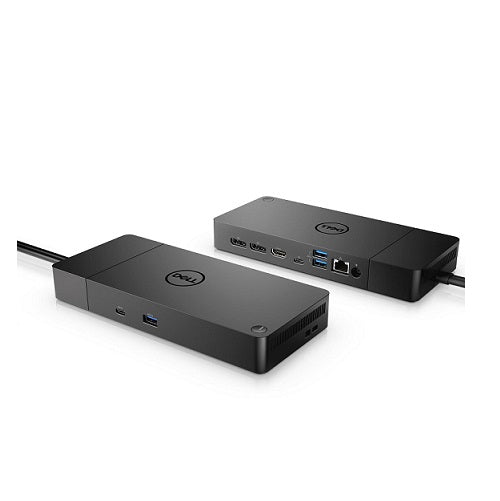
Description Dell Thunderbolt Dock WD19TBS 180W – 210-AZBV Product Type : Docking station Data Link Protocol : Gigabit Ethernet OS Required : Red Hat Enterprise Linux, Windows 10, Ubuntu 18.04 Dell Thunderbolt Dock WD19TBS 180W Boost your PC’s power with ExpressCharge Boost on the world’s most powerful and first modular Thunderbolt dock with a future-ready design*. WD19TBS is a simplified version of WD19TB without 3.5mm ports. Overview Features and Design Industry Standard Compatibility Dell Thunderbolt Dock – WD19TBS offers the greatest compatibility across Dell Commercial laptops. The WD19TBS dock is also compatible with notebooks from other manufacturers such as HP and Lenovo which support industry standards for Thunderbolt docking. Power your connections Power your day: Dell ExpressCharge allows you to charge up to 80% in one houri, making it the most efficient way to manage the workday. Energize your workload: Get more done, faster, with Dell ExpressCharge Boost, a feature that provides up to a 35% charge in just 20 minutes. Unmatched charging: Increase your power delivery and charge even faster with a dock that delivers up to 130W of power. Built for the future Mix and match: Evolve as your needs change with our Dell Thunderbolt™ Dock. The future-ready design lets you swap out modules with ease if you need to do field replacements or upgrade your systems. Ultimate connectivity: Thunderbolt™ connectivity makes it easier than ever to deliver power, data, audio and video as well as connect to system peripherals, no matter what system you use. Plus, with support for up to three displays, including a single 5K and dual 4K monitors, you can connect to everything you need. Clean and clutter-free: Stay productive by mounting your dock behind your monitor or under your desk with the optional, secure VESA Mount, that offers the complete flexibility with the built-in 0.8-meter cable. Information in a flash: With data transfer speeds of up to 40Gbps for faster data transfer, you can stay productive when connected to all your devices. Optimize your workspace Smooth and seamless: Work without disruptions utilizing a single firmware on our most manageable docks ever. Plus, with Dell Client Command Suite and Microsoft System Center Configuration Manager, you can quickly and easily update your firmware without rebooting your dock. Secure manageability: Keep your information safe with MAC Address pass-thru and remote port-disablement. Plus, with features like PXE Boot, Wake-on-LAN and more, it’s easier than ever to stay productive while managing your dock. Connectivity Options Ports & Slots: 1. USB-C 3.1 Gen 2 | 2. USB-A 3.1 Gen 1 with PowerShare | 3. DisplayPort 1.4 (2) | 4. HDMI 2.0b | 5. USB-C Multifunction DisplayPort | 6. Dual USB-A 3.1 Gen 1 | 7. Gigabit Ethernet RJ45 | 8. Power In | 9. Thunderbolt 3 Published on lastbestprice.com Short Tech Specification Product Type Docking station Dimensions (WxDxH) 20.5 cm x 9 cm x 2.9 cm Video Interfaces HDMI, DP Networking Gigabit Ethernet Power Power adapter 180 Watt AC 120/230 V (50/60 Hz) Docking Interface USB-C / Displayport Colour Black Weight 585 g
Related products
$ 70.61
$ 76.28
$ 47.68
$ 64.86
$ 41.50